Project Launcher for Mac
Stop hunting for folders and typing npm run dev a dozen times a day. Dev WorkDir opens your projects, editors & terminals — one click, every time.
Free to use · Pro unlock at $29.99 one-time · No subscription · No cloud
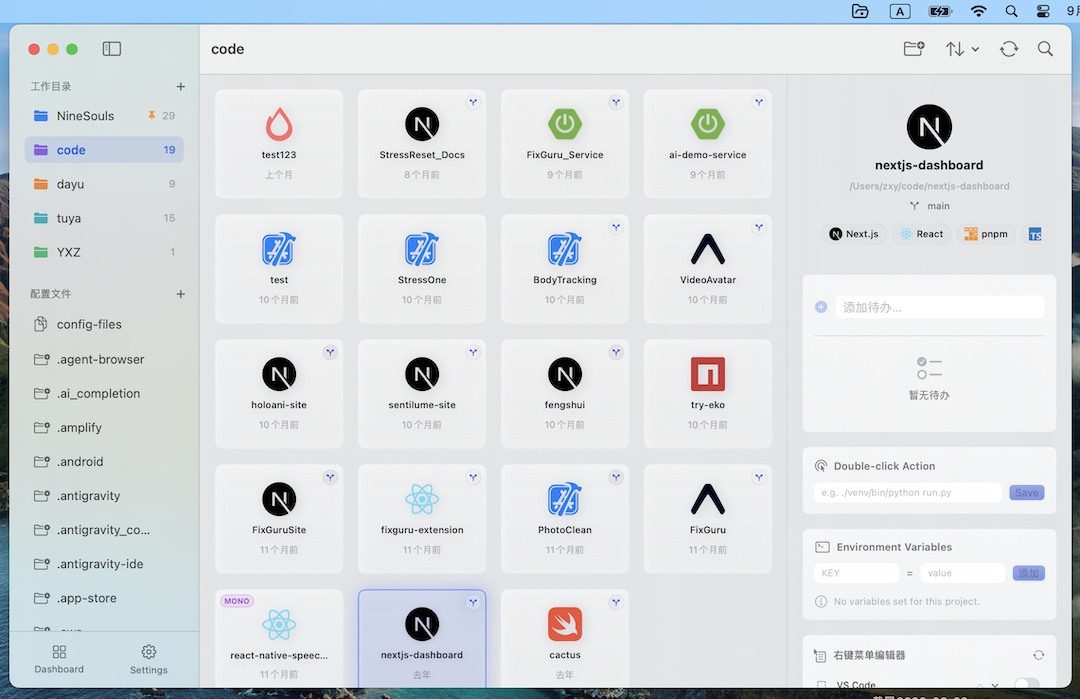
What a project launcher for Mac actually does
It collapses the five-step "open a project" ritual into one click.
- Find the folder — you don't. Projects live in a card list or your menu bar.
- Guess the editor — Dev WorkDir remembers it (37 editors: Cursor, Windsurf, VS Code, Trae, Xcode, JetBrains…).
- Open a terminal — it opens one for you, in the right folder.
- Remember the run command — auto-detected per project (npm run dev, python main.py, cargo run…).
- Type it — a double-click on the card runs it.
Why developers switch
Menu bar & desktop widget
Recent projects live in your menu bar or a floating desktop widget — no window, no searching, no context switch.
Double-click to run
Open your editor and start the dev server at the same time. The run command is remembered per project.
37 editors + 6 terminals
From Cursor and Windsurf to Xcode and JetBrains. Pro adds iTerm2, Warp, Ghostty, Kitty, Alacritty, WezTerm.
Framework & Git at a glance
Auto-detected tech-stack badges and the current Git branch on every card. No opening files to figure out where you are.
Built for the way you actually work
Wrangle many side projects
If your ~/Projects folder is a graveyard, a launcher turns it back into something you can open on demand. See too many side projects.
Run npm scripts without a terminal
Double-click a project card and npm run dev starts in your terminal — no typing, no cd. See our macOS guide.
Navigate a monorepo without losing context
Dev WorkDir auto-detects monorepos, shows a MONO badge, and lists every sub-project as a card. See managing a monorepo.
Keep ideas in one place
Project-level todos feed a global Watchtower view — organized without opening another app. See project todos.
Put every project a double-click away
Free to start. One-time Pro if you want your favorite terminal and analytics.